GitHub for Mac: Username Autocompletion
Today’s release of GitHub for Mac adds the ability to autocomplete GitHub usernames right within the commit summary and description fields. This works just like comment fields on GitHub.com. By…
Today’s release of GitHub for Mac adds the ability to autocomplete GitHub usernames right within the commit summary and description fields.
This works just like comment fields on GitHub.com. By typing @ and then the start of either the username or name of the GitHub user you want to mention, you are greeted with a (rather wonderful) little popover:
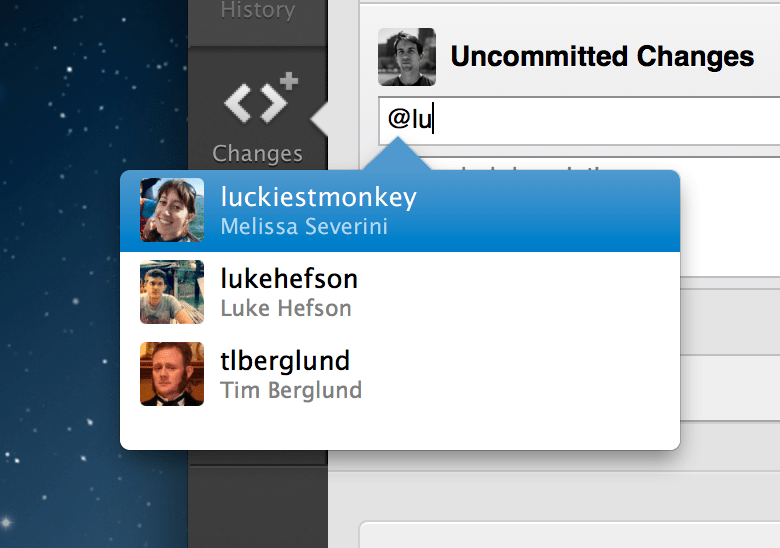
Navigate with the arrow keys, or continue typing, to select your desired user. Hit Return or Tab to fill their username into the text field.
Goodbye Snow Leopard
Recently, with the vast majority of our users running at least Lion, we made the decision to no longer support Mac OS X 10.6. We also wanted to make use of the improvements available to developers in OS X 10.7 (Lion) and 10.8 (Mountain Lion).
Therefore, going forward, releases of GitHub for Mac will require an install of at least 10.7 to run. If you are running Snow Leopard, you simply won’t see any new updates and can continue to run your existing version.
Written by

Related posts

We need a European Sovereign Tech Fund
Open source software is critical infrastructure, but it’s underfunded. With a new feasibility study, GitHub’s developer policy team is building a coalition of policymakers and industry to close the maintenance funding gap.

GitHub Availability Report: June 2025
In June, we experienced three incidents that resulted in degraded performance across GitHub services.

From pair to peer programmer: Our vision for agentic workflows in GitHub Copilot
AI agents in GitHub Copilot don’t just assist developers but actively solve problems through multi-step reasoning and execution. Here’s what that means.